Understanding AWS Elastic Container Service (ECS)
My name is Hamza Rehman. I'm a passionate DevOps enthusiast. With a deep interest in open-source technologies and automation, I enjoys to share my knowledge and insights with the community.
Amazon Elastic Container Service (ECS) is a fully managed container orchestration service that makes it easy to run, scale, and secure Docker container applications on AWS.
What is AWS ECS?
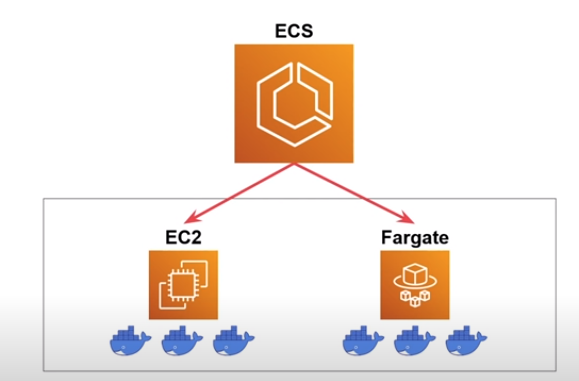
AWS ECS is a scalable container orchestration service that allows you to run Docker containers in a highly available and secure environment. ECS can run on AWS Fargate, which is a serverless compute engine for containers, or on Amazon EC2 instances. With ECS, you can deploy and manage containerized applications without having to manage the underlying infrastructure.
Key Features of AWS ECS
1. Fully Managed Orchestration
ECS takes care of the container orchestration, allowing you to focus on building and deploying your applications. It manages the placement, scaling, and monitoring of your containers.
2. Integration with AWS Services
ECS integrates seamlessly with other AWS services such as IAM, VPC, CloudWatch, and Route 53. This integration simplifies the deployment and management of containerized applications.
3. Scalability
ECS automatically scales your applications to handle varying levels of traffic, ensuring that your containers run efficiently and reliably.
4. Security
ECS provides robust security features, including IAM roles for task execution, VPC network isolation, and integration with AWS Secrets Manager for secure storage of sensitive data.
5. Flexible Deployment Options
ECS supports multiple deployment options, including AWS Fargate for serverless container execution and Amazon EC2 for more control over the underlying infrastructure.
6. Service Discovery
ECS integrates with AWS Cloud Map and Route 53 to provide service discovery, allowing your applications to dynamically discover and connect with other services.
7. Task Definitions
Task definitions in ECS define the containers that will be run, including their configurations such as CPU and memory requirements, networking settings, and environment variables.
Advanced Features
1. Service Autoscaling
ECS supports service autoscaling, allowing you to automatically scale your services based on demand. You can set up scaling policies to increase or decrease the number of running tasks in response to metrics such as CPU utilization or request rate.
2. Task Networking (awsvpc)
The awsvpc network mode in ECS provides each task with its own network interface, allowing for better network isolation and security. This mode is particularly useful for services that require direct exposure to the internet or need to communicate with other services within a VPC.
3. AWS Fargate
AWS Fargate is a serverless compute engine for containers that works with ECS. It allows you to run containers without managing the underlying infrastructure. Fargate automatically provisions the necessary compute resources, simplifying the deployment process.
5. Integration with CI/CD Pipelines
ECS integrates with AWS CodePipeline, CodeBuild, and CodeDeploy to provide a complete CI/CD pipeline for containerized applications. This integration streamlines the process of building, testing, and deploying your applications.

Conclusion
Amazon Elastic Container Service (ECS) is a powerful and scalable container orchestration service that simplifies the deployment and management of containerized applications. With its robust security features, seamless integration with other AWS services, and advanced capabilities like service autoscaling and AWS Fargate, ECS provides a comprehensive solution for running Docker containers in the cloud. Whether you are building microservices, deploying enterprise applications, or running batch jobs, ECS helps streamline your container workflows and enhance your deployment process.
